连续布局
异构矩形组件、连续布局生成器,使用脚本layout_generator generate_c 配合配置文件与命令行参数生成所布局图像与温度场数据。
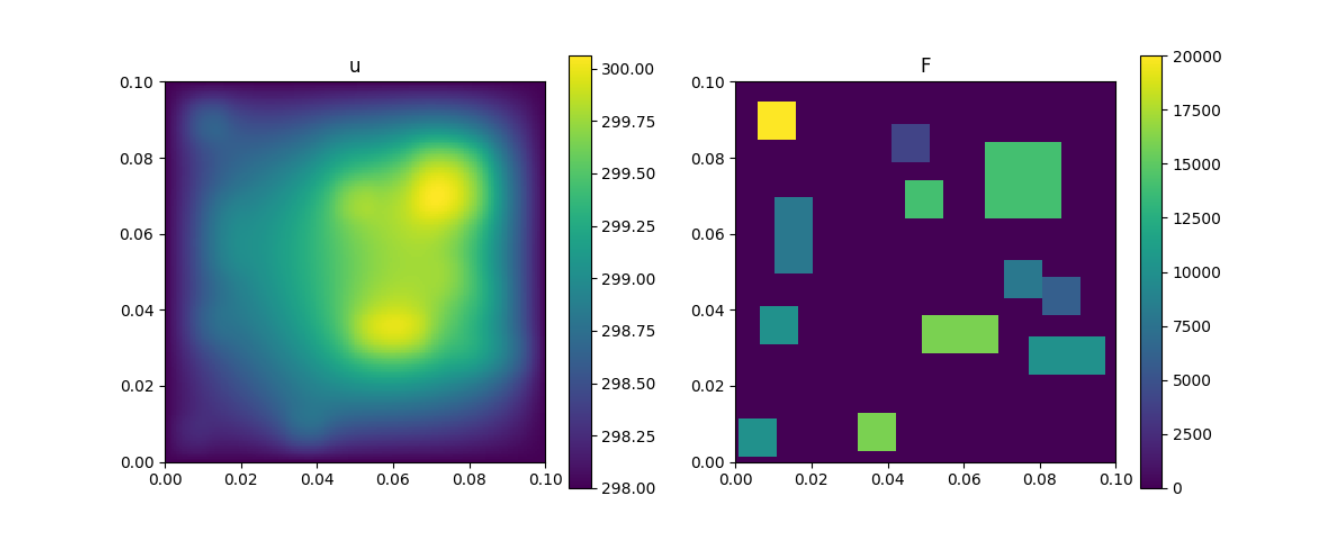
采样方法
- [x] 按顺序摆放 (对应参数 sampler: sequence)
- 参数要求:每个组件的尺寸需满足
unit_x / length * nx与unit_y / length * nx为偶数
- 参数要求:每个组件的尺寸需满足
- [x] Gibbs 采样 (对应参数 sampler: gibbs)
用法
- 使用配置文件或命令行生成数据集,比如以默认配置文件
default_c.yml生成数据集,其中default_c.yml在目录utils下。 - 或使用自定义配置文件
--config 配置文件路径- 配置文件以 YAML 格式存储
- 优先级:命令行参数 > 配置文件参数 > 默认参数
layout_generator generate_c -h获取脚本帮助
usage: layout_generator generate_c [-h] [--config CONFIG] [--test]
                                   [--length LENGTH]
                                   [--length_unit LENGTH_UNIT] [--bcs BCS]
                                   [--data_dir DATA_DIR]
                                   [--fem_degree FEM_DEGREE] [--u_D U_D]
                                   [--nx NX] [--sample_n SAMPLE_N]
                                   [--seed SEED] [--file_format {mat}]
                                   [--prefix PREFIX] [--method {fenics}]
                                   [--worker WORKER] [--ndim {2,3}] [--vtk]
                                   [-V] [--task {discrete,continuous}]
                                   [--units UNITS] [--powers POWERS]
                                   [--angles ANGLES]
                                   [--sampler {sequence,gibbs}]

Args that start with '--' (eg. --test) can also be set in a config file
(/home/fenics/shared/layout-generator/layout_generator/utils/default_c.yml or
specified via --config). The config file uses YAML syntax and must represent a
YAML 'mapping' (for details, see http://learn.getgrav.org/advanced/yaml). If
an arg is specified in more than one place, then commandline values override
config file values which override defaults.

optional arguments:
  -h, --help            show this help message and exit
  --config CONFIG       config file path
  --test                test mode
  --length LENGTH       board length
  --length_unit LENGTH_UNIT
                        unit length
  --bcs BCS             Dirichlet boundaries
  --data_dir DATA_DIR   dir to store generated layout data
  --fem_degree FEM_DEGREE
                        fem degree in fenics
  --u_D U_D             value on Dirichlet boundary
  --nx NX               number of grid in x direction
  --sample_n SAMPLE_N   number of samples
  --seed SEED           seed in np.random module
  --file_format {mat}   dataset file format
  --prefix PREFIX       prefix of file
  --method {fenics}     method to solve the equation
  --worker WORKER       number of workers
  --ndim {2,3}          dimension
  --vtk                 output vtk file
  -V, --version         show program's version number and exit
  --task {discrete,continuous}
                        task
  --units UNITS         shape of each unit
  --powers POWERS       power of each unit
  --angles ANGLES       angle of each unit
  --sampler {sequence,gibbs}
                        sampler method
- 默认配置文件参数 (yaml)
# config example

task: continuous
ndim: 2 # dimension
length: 0.1

units:  # unit shape
    - [0.01, 0.01]
    - [0.01, 0.01]
    - [0.01, 0.01]
    - [0.01, 0.01]
    - [0.01, 0.01]
    - [0.01, 0.01]
    - [0.01, 0.01]
    - [0.01, 0.01]
    - [0.02, 0.01]
    - [0.02, 0.01]
    - [0.02, 0.01]
    - [0.02, 0.02]

powers:
    - [2000, 3000]
    - 1000
    - 1000
    - 1000
    - 1000
    - 1000
    - 1000
    - 1000
    - 1000
    - 1000
    - 1000
    - 1000


angles: [0, 0, 0, 0, 0, 0, 0, 0, 0, 90, 90, 0]

u_D: 298
# bcs:
#     - [[0.01, 0], [0.02, 0]]
#     - [[0.08, 0], [0.09, 0]] # 2d example
# bcs:
#     - [[0, 0.05, 0.05], [0, 0.07, 0.07]]  # 3d example
bcs: []  # all are Dirichlet BCs
data_dir: example_dataset
file_format: mat
prefix: Example
sampler: sequence
sample_n: 2
# seed: 100

fem_degree: 1
nx: 200
# ny: 21
# nz: 21

method: fenics
参数说明
units: 每个组件的宽与高powers: 每个组件的功率,单个组件可有多个备选功率angles: 每个组件的摆放角度,暂时支持 0 与 90sampler: 采样方法sequence: 顺序摆放采样方法gibbs: Gibbs 采样方法